
Kubectl Confirm: VS Code extension
When you work with Kubernetes every day, the dangerous commands are usually not complicated. They are the simple ones you run too fast.
kubectl apply -f deployment.yamlkubectl delete -f service.yamlThose commands are normal parts of Kubernetes operations. However, they become expensive mistakes when your terminal is pointed at the wrong cluster, the wrong namespace, or the wrong file.
Kubectl Confirm is a VS Code Kubernetes extension that adds a small safety layer around that workflow without moving Kubernetes work out of VS Code.

The problem
Most DevOps engineers already have a routine for checking context before touching a cluster. Run
In practice, those routines are easy to skip during incidents or fast production changes. VS Code makes it convenient to open and edit YAML files, but the final step often drops back into a terminal where context can be easy to miss.
Kubectl Confirm keeps the workflow inside the editor and makes the risky parts visible before the command is sent.
kubectl config current-context, check the file path, maybe run a diff, then apply.In practice, those routines are easy to skip during incidents or fast production changes. VS Code makes it convenient to open and edit YAML files, but the final step often drops back into a terminal where context can be easy to miss.
Kubectl Confirm keeps the workflow inside the editor and makes the risky parts visible before the command is sent.
VS Code Kubernetes extension features
Kubectl Confirm adds Kubernetes commands to the VS Code explorer context menu. From a YAML file or folder, you can run common
kubectl operations without manually typing the path.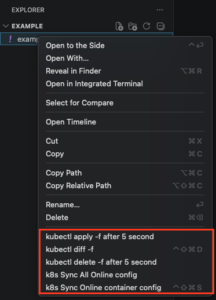
For day-to-day Kubernetes work, the extension supports:
–
kubectl apply -f for files and folders–
kubectl diff -f for files and folders–
kubectl delete -f for manifest files–
kubectl apply -k for kustomize directories–
kubectl diff -k for kustomize directories– Syncing live Kubernetes resource configuration back to local YAML
– CD into selected folder
The main goal is not to replace
kubectl. Instead, the extension makes the command you were already going to run harder to execute blindly.Safer Kubernetes apply and delete workflows
For apply and delete operations, Kubectl Confirm shows the active Kubernetes context and the exact command before execution. This is the part I care about most.
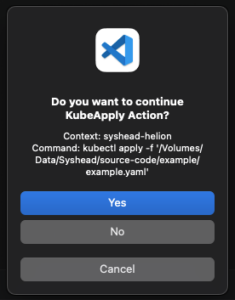
Seeing the current context inside the confirmation dialog makes it much harder to accidentally apply staging work to production or delete something from the wrong cluster.
The confirmation step includes:
– The current
kubectl context– The exact
kubectl command– The selected file or folder path
– A manual confirmation action before anything runs
For teams managing multiple kubeconfigs, terminals, or VS Code windows at the same time, this becomes especially useful.
A cancellable countdown for safer kubectl workflows
After confirmation, the extension starts a visible five second countdown before sending the command to the active terminal.

More importantly, that delay is intentional. It gives you one more chance to stop the command if something looks wrong after you click confirm.
However, this is not a replacement for RBAC, admission control, GitOps, policy engines, or proper review. Instead, it acts as a local guardrail for the human part of the workflow. In practice, that is where many mistakes start.
Diff first, apply second
The extension also exposes
kubectl diff directly from the right-click menu. This keeps the safer path short:1. Right-click the manifest or folder.
2. Run diff.
3. Review what Kubernetes would change.
4. Run apply only after the diff makes sense.
For kustomize directories, the same pattern applies with
kubectl diff -k and kubectl apply -k.In practice, engineers eventually bypass workflows that slow them down. The extension tries to keep the safe path close to the normal muscle memory.
Syncing live resources back to YAML
Kubectl Confirm also includes commands for syncing online Kubernetes resource configuration back into local YAML using
kubectl-sync2local.For example, this becomes useful when you need to compare what is running in the cluster with what is currently in your local manifests. Additionally, it helps during cleanup, drift checks, and situations where someone changed a resource outside the expected workflow.
I still prefer Git as the source of truth, but in real environments you sometimes need to inspect and reconcile what is actually running. Having that command one click away is practical.
Who should use this VS Code Kubernetes extension
This extension is for engineers who already use VS Code for Kubernetes YAML and want fewer sharp edges around day-to-day
kubectl work.It fits teams and individuals who:
– Switch between multiple Kubernetes clusters
– Work with production and non-production manifests in the same editor
– Prefer reviewing diffs before applying changes
– Want a visible confirmation step for destructive commands
– Need quick access to common
kubectl actions from the file explorerThe extension is intentionally small. Rather than becoming a full Kubernetes dashboard, it adds checks around the commands DevOps engineers already use.
Requirements
Kubectl Confirm expects a normal local Kubernetes setup:
– VS Code
–
kubectl installed and available in your PATH– A configured kubeconfig
– Access to the clusters you want to manage
The extension sends commands to the active VS Code terminal after confirmation. That keeps the output visible and leaves the final execution environment familiar.
Final thoughts on safer Kubernetes workflows in VS Code
Kubernetes safety is usually built in layers. RBAC, namespaces, admission policies, CI checks, GitOps workflows, and reviews all matter.
Kubectl Confirm focuses on a smaller layer: the moment before a human runs a command from their editor.
For Kubernetes teams working inside VS Code, that moment is worth guarding. Showing the active context, showing the exact command, requiring confirmation, and adding a short cancellable delay can prevent a bad click or a rushed command from becoming a production issue.
That is the reason this extension exists.
You can find the extension here in VS Marketplace
Source code is here.
Read more sysHead Labs blogs here.